About Maintenance Tank Chip Resetter For Epson L18050/L8050
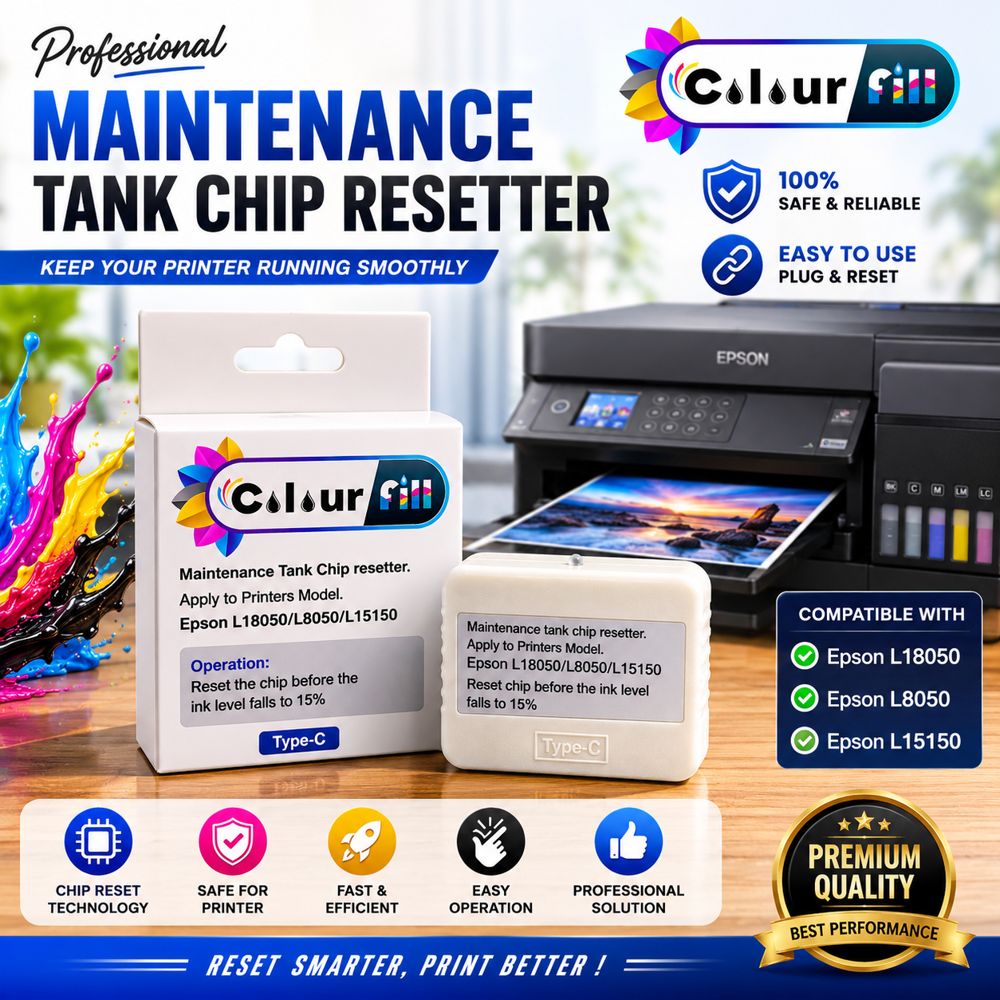
Keep your Epson printer running smoothly with the Colour Fill Maintenance Tank Chip Resetter. This smart and reliable device allows you to reset the maintenance tank chip quickly and easily, helping you avoid unnecessary downtime and costly replacements.
Designed for professionals, print shops, DTF users, and businesses, this resetter provides a fast and efficient solution for restoring maintenance tank chip status and keeping your printer ready for continuous production.
Compatible with Epson L18050, L8050, and L15150 printers, the device features a convenient Type-C interface for modern connectivity and hassle-free operation.
Key Features
Quick & Easy Chip Reset
Plug & Play Operation
High Reset Success Rate
Compact & Portable Design
Durable & Reliable Performance
Type-C Connectivity
Saves Time & Maintenance Costs
Ideal for DTF, Sublimation & Commercial Printing
Compatible Printer Models
Efficient Resetting for Epson PrintersSpecifically designed for Epson L18050 and L8050 printers, this chip resetter enables you to efficiently reset the maintenance tank chip-extending maintenance box life and reducing printer downtime. Operating with a simple manual press, the resetter's LED indicator confirms status, making the process quick and straightforward for both professional and personal use.
Portable and Easy to OperateCompact in size and crafted from durable ABS plastic, this resetter is ready for use anywhere. The lightweight 25-gram design makes it highly portable, while silent operation ensures minimal disruption in any setting. The plug-and-play interface and clear instruction manual allow for easy use regardless of technical background.
FAQ's of Maintenance Tank Chip Resetter For Epson L18050/L8050:
Q: How do I use the Maintenance Tank Chip Resetter with my Epson L18050 or L8050 printer?
A: To use the resetter, align the maintenance tank chip with the chip contact interface on the device, then press down to initiate the reset. The LED indicator will light up to show reset status. Follow the included user manual for step-by-step guidance.
Q: What is the benefit of resetting the printer's maintenance tank chip?
A: Resetting the maintenance tank chip allows you to reuse the maintenance box, reducing cost and waste. It helps keep your Epson L18050 or L8050 operational without needing frequent replacement of the tank.
Q: When should I reset my printer's maintenance tank chip?
A: You should reset the chip when your Epson printer notifies you that the maintenance box is full or near end of service life. Resetting should only be done after properly cleaning or replacing the maintenance box to avoid overflow and printer damage.
Q: Where can I operate this chip resetter?
A: The resetter can be used in a variety of environments, as it operates reliably within a wide temperature range (5C-40C) and humidity (20-85% RH, no condensation). Its compact size and battery or USB power options make it suitable for use at home, office, or on-site printer maintenance.
Q: What compatible models can this resetter be used with?
A: This resetter is compatible with Epson L18050 and L8050 printers, specifically designed for maintenance tank chip resetting on these models.
Q: What accessories are included with the Maintenance Tank Chip Resetter?
A: Each package includes the chip resetter and a user manual, providing easy-to-follow instructions for safe and efficient operation.
Q: Is the Maintenance Tank Chip Resetter compliant with environmental regulations?
A: Yes, the device is RoHS compliant, ensuring it meets rigorous environmental standards and contains no hazardous substances.





 Send Inquiry

 Send Inquiry
 Send Inquiry
 Send SMS